https://popcar.bearblog.dev/how-to-minify-godots-build-size/
コミュニティ内で共有されていたリンクで「まさに気になっていた!!」って感じの紹介があったのでメモ
Cloudflare Pagesの制限で25MBのファイルまでしか上げられないっていうのがあるのだけど、もしかするとその制約に引っかからない感じのエクスポートできるのかも!?!?と思ったり
ちょっと見てみる
ふむ・・・見た感じ。減ることは減るとはいえ、webは結構最初から絞られているから変わらない感じだろうか?
https://docs.godotengine.org/en/stable/tutorials/export/exporting_for_web.html#doc-exporting-for-web-serving-the-files
ここの圧縮的なものをCloudflare Pagesで使えたりしないかなぁっていうのを見ていくのも大切な感じだろうか?
あと、最近のバージョン4.5辺りから?この辺がやりやすくなったような感じもあるんだね?
https://docs.godotengine.org/en/stable/tutorials/editor/using_engine_compilation_configuration_editor.html
これかも、ドキュメント眺めていてよくわかっていなかったけど気になっていたんだよね。
読んだけどよくわからん!!!
Optimizing a build for size — Godot Engine (stable) documentation in English
https://docs.godotengine.org/en/stable/engine_details/development/compiling/optimizing_for_size.html
godotのエクスポートについて教えてほしい。容量を少なくしてエクスポートしたくて
https://docs.godotengine.org/en/stable/tutorials/editor/using_engine_compilation_configuration_editor.html#doc-engine-compilation-configuration-editor
ここで紹介されているエディタをいじったんだけど、いまいちそのあとに何をしたら良いのかがわかっていなかったり、コンパイルについての理解があんまりわかっていないみたい・・・
web向けのエクスポートの容量を減らしたいと思ったときに、何に対してなんの後に何をコンパイルしたいいのか教えてほしい・・・
基本的にgodotの方で最初から提供されているコンパイル済みのゲーム実行用のファイルとgodotプロジェクト内で自分たちが変更したものをセットにしたものが本来エクスポート画面から作られるんだけど、「godotの方でコンパイルされているゲームの実行とかを持っている部分」っていうのは必要以上に機能を持っていることがあるから、そこの機能を省いたものを紹介されているエディタで作って、それで自分の方でコンパイルを行って、それを利用できるよっていう話なの???
じゃあそれを利用するにはどうしたらいいの???よくわかっていない・・・
とりあえずやってみる(コンパイルの方)
よくわからないけどとりあえずAIさんと相談しながらやってみる(本当に正しくできているのか?)
https://docs.godotengine.org/ja/4.x/engine_details/development/compiling/compiling_for_web.html
https://docs.godotengine.org/ja/4.x/engine_details/development/compiling/optimizing_for_size.html
https://docs.godotengine.org/ja/4.x/tutorials/editor/using_engine_compilation_configuration_editor.html#doc-engine-compilation-configuration-editor
↑このあたりを見ながら進めていく感じだろうかね
使用しない機能を省いたものを作るっていう感じでやっていくのでそのための事前準備をする
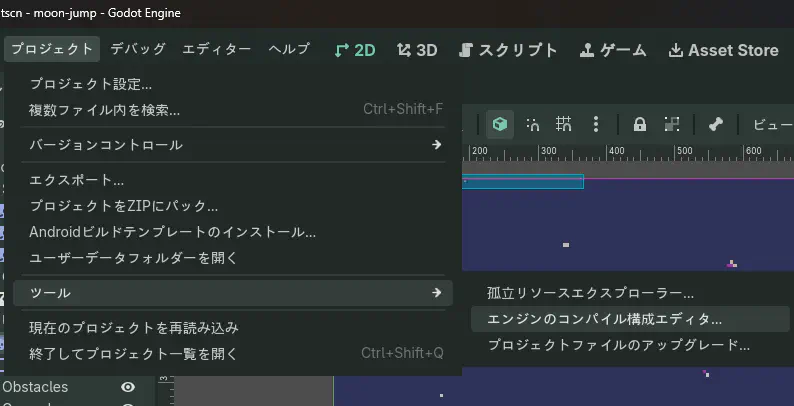
エンジンのコンパイル構成エディタを開く
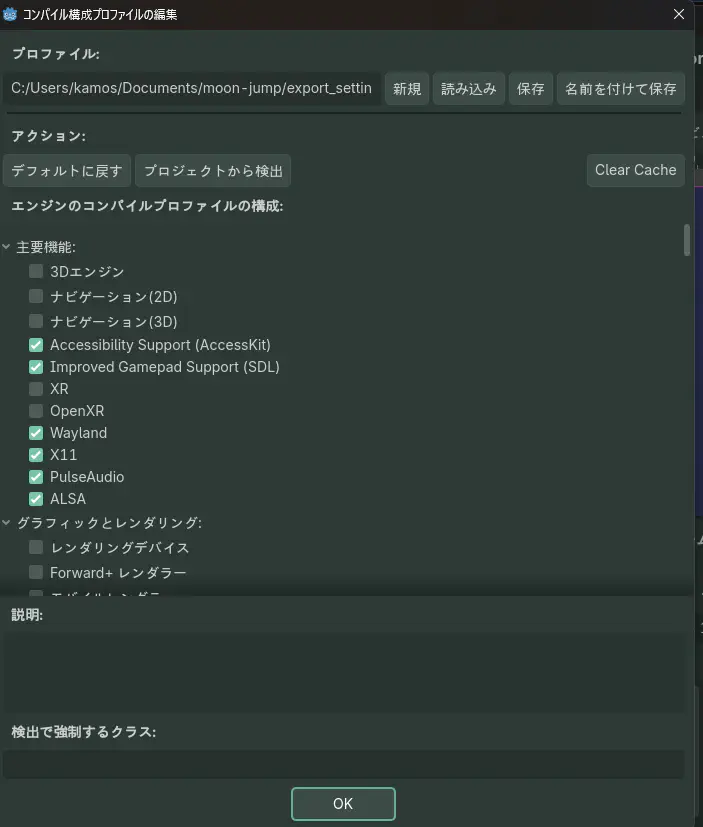
プロジェクトから検出っていうのを押すと、使われている機能がチェックされた状態になるみたい(時々ポンコツなこともあるみたいなので注意だけど)
で、そのあとに名前を付けて保存をしておく
で、その後に結果的にやった手順としては、
- godot_export用のディレクトリを作る
- godotのソースコードをgit cloneする
- godotのソースコードをビルドするために必要なものをインストールする(webの場合はemsdkというものが必要っぽい。配置箇所を間違えた感があるが・・・)
で、色々コマンドを打っていく感じ。自分が使ったよ(windowsでの手順を一応おいておく)
(build_profileはさっき作ってたエクスポート設定のファイルを指定する感じ)
 1
 2
 3
 4
 5
 6
 7
 8
 9
10
11
12
|
cmd
cd /d C:\Users\kamos\codes\godot_export
call .venv\Scripts\activate.bat

cd /d C:\Users\kamos\emsdk
call emsdk.bat activate latest
call emsdk_env.bat

cd /d C:\Users\kamos\codes\godot_export\godot
git checkout 4.7.2-stable

scons platform=web target=template_release build_profile="C:\Users\kamos\Documents\moon-jump\export_settings_reduce.gdbuild"
|
大体17分くらい自分の環境ではかかったみたい。
エクスポートしてみる
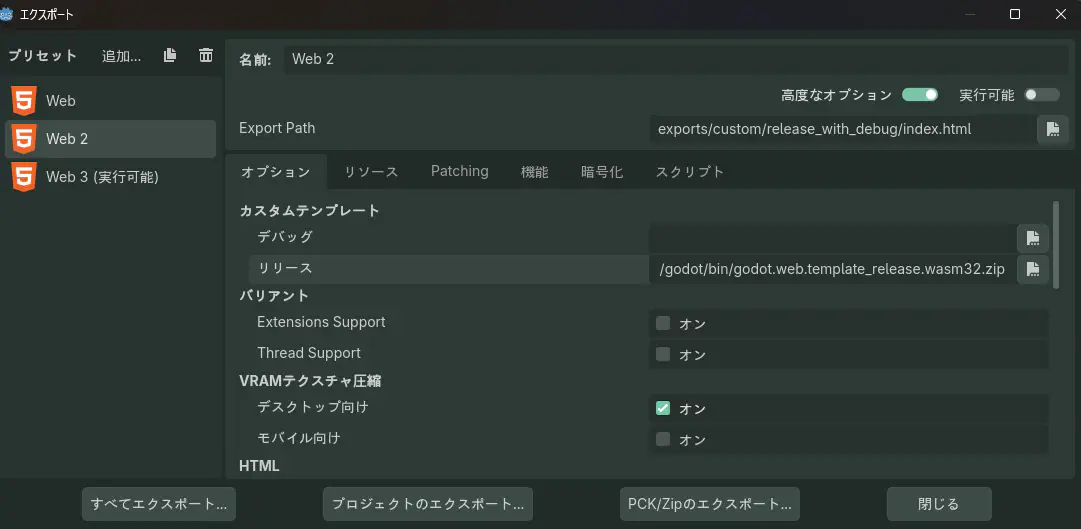
ここのカスタムテンプレートのリリースっていうのにコンパイルでできたものをしているすると多分・・・多分・・・それでできているっぽいかなぁ?と思った
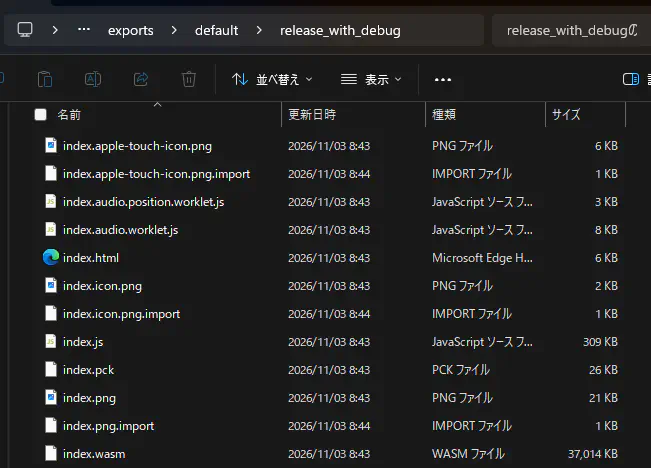
で、結果を見てみたのだけどサイズ変わってねぇじゃねぇか!!
| 変更前 |
変更後 |
|
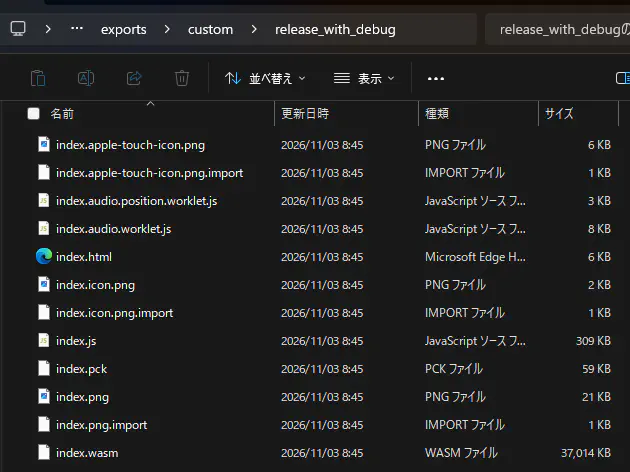
|
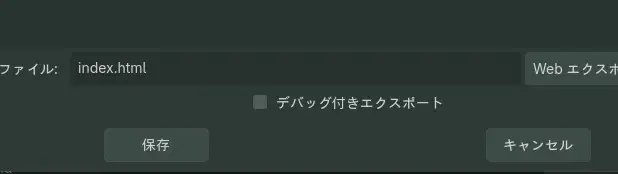
なんでだろう・・・?と思ったんだけど、エクスポート時のデバッグ付きエクスポートっていうののチェックを外したらサイズが減るようになった!!!
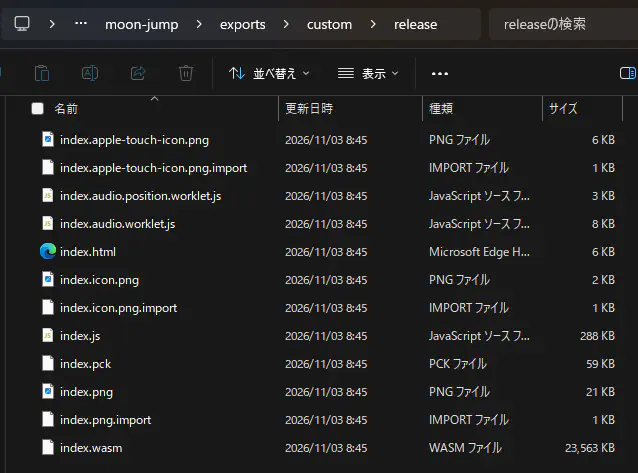
全部で23.3MBくらいになって入るみたいねぇ・・・うーん・・・Cloudflare Pagesの制限を考えるとギリギリ過ぎるなぁ・・・
多分圧縮したほうが良いかも(できるなら)
(AIちゃんと相談とかしたりして・・・)
もしかするとこの方式でできるかなぁということを試してみる
hugoを利用しています。先に。
1
2
3
4
5
6
7
|
/*.wasm
  Content-Type: application/wasm
  Content-Encoding: gzip

/*.pck
  Content-Type: application/octet-stream
  Content-Encoding: gzip
|
一旦かの拡張子のものをすべてその扱いにするようにする。
wasm、pckを圧縮する
gzipで圧縮する。ただ、ファイル名を変えるとダメ見たいなので元の拡張子と同じようにする
これで圧縮できるみたい
1
2
|
py -3 -c "from pathlib import Path; import gzip; p=Path('index.wasm'); p.with_name(p.name + '.gz').write_bytes(gzip.compress(p.read_bytes(), compresslevel=9))"
py -3 -c "from pathlib import Path; import gzip; p=Path('index.pck'); p.with_name(p.name + '.gz').write_bytes(gzip.compress(p.read_bytes(), compresslevel=9))"
|
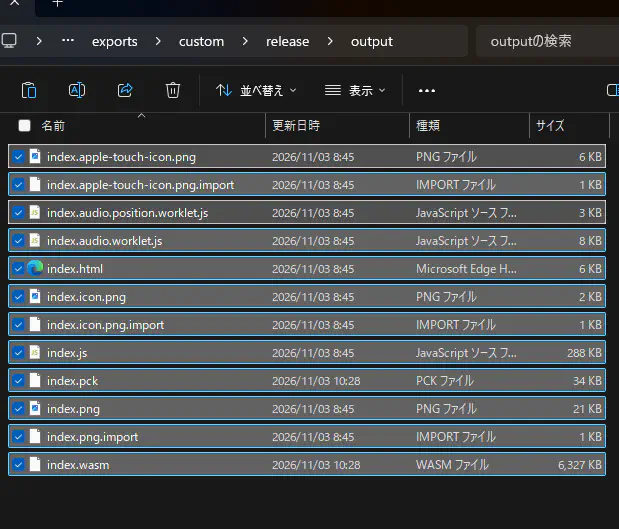
これで6.53MB!!!
これで動かたら完璧!!!
1
2
3
4
5
6
7
|
{{< godot-game
  path="output/game.html"
  title="ゲーム"
  width="100%"
  height="720px"
  allow="fullscreen; autoplay"
>}}
|
ショートコードを作ってもらった
 1
 2
 3
 4
 5
 6
 7
 8
 9
10
11
12
13
14
15
|
{{- $path := .Get "path" | default "output/index.html" -}}
{{- $title := .Get "title" | default "ゲーム" -}}
{{- $allow := .Get "allow" | default "fullscreen; autoplay" -}}
{{- $width := .Get "width" | default "100%" -}}
{{- $height := .Get "height" | default "720px" -}}
{{- with .Page.Resources.Get $path -}}
  <iframe
    src="{{ .RelPermalink }}"
    title="{{ $title }}"
    allow="{{ $allow }}"
    style="display: block; width: {{ $width }}; height: {{ $height }}; border: 0;">
  </iframe>
{{- else -}}
  {{- errorf "ゲームHTMLが見つかりません: %s" $path -}}
{{- end -}}
|
もらおうと思ったけど色々なんかhugoの関係でか???全くうまくいかなかったので(AIちゃんと色々話しながらやったんだけどね・・・)static配下に置く形式に直しました・・・
 1
 2
 3
 4
 5
 6
 7
 8
 9
10
|
<div style="position: relative; margin-inline: auto;
            width: min(100%, 1152px);
            aspect-ratio: 1152 / 648; background: #000;">
  <iframe
    src="/game/godot-web-export-size-down/output/?v=2"
    title="ゲーム"
    allow="fullscreen; autoplay; cross-origin-isolated"
    style="position: absolute; inset: 0; width: 100%; height: 100%; border: 0;">
  </iframe>
</div>
|
で、hugoの方だとなんか圧縮の設定が簡単にできないっぽいのでいったん上げてみてどうなるか見てみたいね。
なんかヘッダーの設定がダメだったみたい・・・ちょっと変えてもらってみた・・・
 1
 2
 3
 4
 5
 6
 7
 8
 9
10
11
|
/game/*.wasm
  Content-Type: application/wasm
  Content-Encoding: gzip

/game/*.pck
  Content-Type: application/octet-stream
  Content-Encoding: gzip

/game/*
  Cross-Origin-Opener-Policy: same-origin
  Cross-Origin-Embedder-Policy: require-corp
|
なんかワイルドカードの指定がダメだったっポイ??↓の方法だと毎回パス指定をする必要が出てくるからめんどい気がするけど・・・・うーん・・・一旦試そうかな
1
2
3
4
5
6
7
|
/game/godot-web-export-size-down/output/*.wasm
  Content-Type: application/wasm
  Content-Encoding: gzip

/game/godot-web-export-size-down/output/*.pck
  Content-Type: application/octet-stream
  Content-Encoding: gzip
|
う~~mmmm・・・結局どうやら、Content-Encoding: gzip この指定が効かないみたい???
なので、jsで回答する方式にしましょう?という感じで言われてきた感じ・・・
 1
 2
 3
 4
 5
 6
 7
 8
 9
10
11
12
13
14
15
16
17
18
19
20
21
22
23
24
25
26
27
28
29
30
31
32
33
34
35
36
37
38
39
40
41
42
43
44
45
46
47
48
49
50
51
52
53
54
55
56
57
58
59
60
61
62
63
64
65
66
67
68
69
70
71
72
73
|
(() => {
  if (typeof DecompressionStream === 'undefined') {
    console.warn('DecompressionStream is not supported in this browser.');
    return;
  }

  const nativeFetch = window.fetch.bind(window);

  function chain(first, reader) {
    return new ReadableStream({
      start(controller) {
        if (first) {
          controller.enqueue(first);
        }
      },
      async pull(controller) {
        const { value, done } = await reader.read();
        if (done) {
          controller.close();
          return;
        }
        controller.enqueue(value);
      },
      cancel(reason) {
        return reader.cancel(reason);
      },
    });
  }

  window.fetch = async (input, init) => {
    const response = await nativeFetch(input, init);
    const url = new URL(
      typeof input === 'string'
        ? input
        : input instanceof Request
          ? input.url
          : String(input),
      location.href
    );

    if (!response.ok || !response.body || !/\.(wasm|pck)$/.test(url.pathname)) {
      return response;
    }

    const reader = response.body.getReader();
    const first = await reader.read();
    if (first.done) {
      return new Response(null, response);
    }

    const chunk = first.value;
    const isGzip = chunk.length >= 2 && chunk[0] === 0x1f && chunk[1] === 0x8b;
    const body = chain(chunk, reader);

    if (!isGzip) {
      return new Response(body, response);
    }

    const headers = new Headers(response.headers);
    headers.delete('content-encoding');
    headers.delete('content-length');
    headers.set(
      'content-type',
      url.pathname.endsWith('.wasm') ? 'application/wasm' : 'application/octet-stream'
    );

    return new Response(body.pipeThrough(new DecompressionStream('gzip')), {
      status: response.status,
      statusText: response.statusText,
      headers,
    });
  };
})();
|
_headersからも消す
 1
 2
 3
 4
 5
 6
 7
 8
 9
10
11
12
13
14
15
16
17
|
/game/godot-web-export-size-down/output/index.wasm
  Content-Type: application/wasm
  Cache-Control: public, max-age=31536000, immutable, no-transform
  Vary: Accept-Encoding

/game/godot-web-export-size-down/output/index.pck
  Content-Type: application/octet-stream
  Cache-Control: public, max-age=31536000, immutable, no-transform
  Vary: Accept-Encoding

/game/*
  Cross-Origin-Opener-Policy: same-origin
  Cross-Origin-Embedder-Policy: require-corp

/posts/2026/11/godot-web-export-size-down*
  Cross-Origin-Opener-Policy: same-origin
  Cross-Origin-Embedder-Policy: require-corp
|
iframeで埋め込む場合、親ページ(記事ページ)にも同じCOOP/COEPヘッダーが必要。cross-origin isolatedはトップレベルからiframeまでのフレームチェーン全体で成立するため。
出力されるindex.htmlでjsを読み込むようにする
そして、Head Includeに入れると良いかもしれない。
1
|
<script src="/js/godot-gzip-loader.js"></script>
|
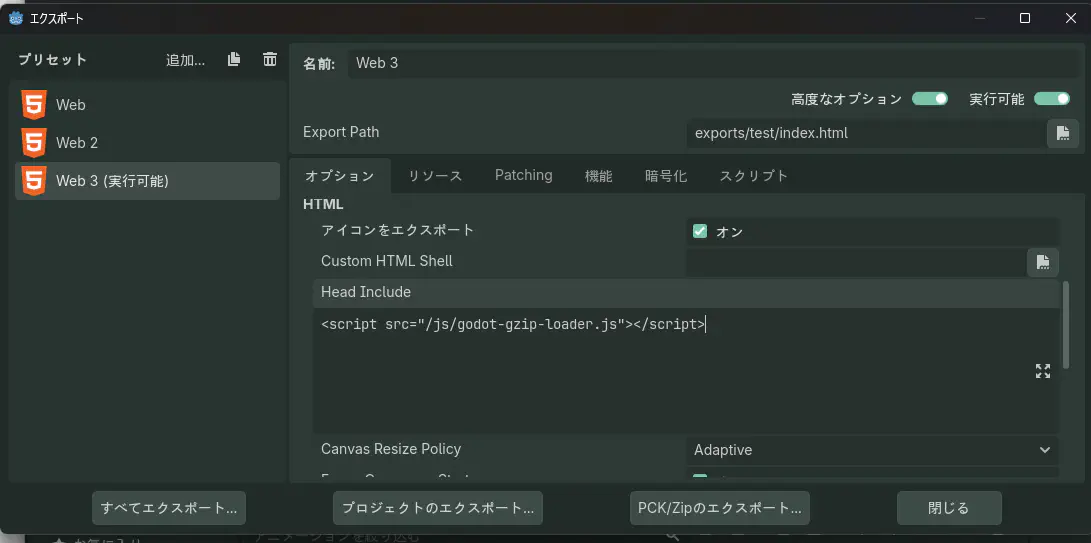
ここに入れておくと出力時に加えてくれるのかな??
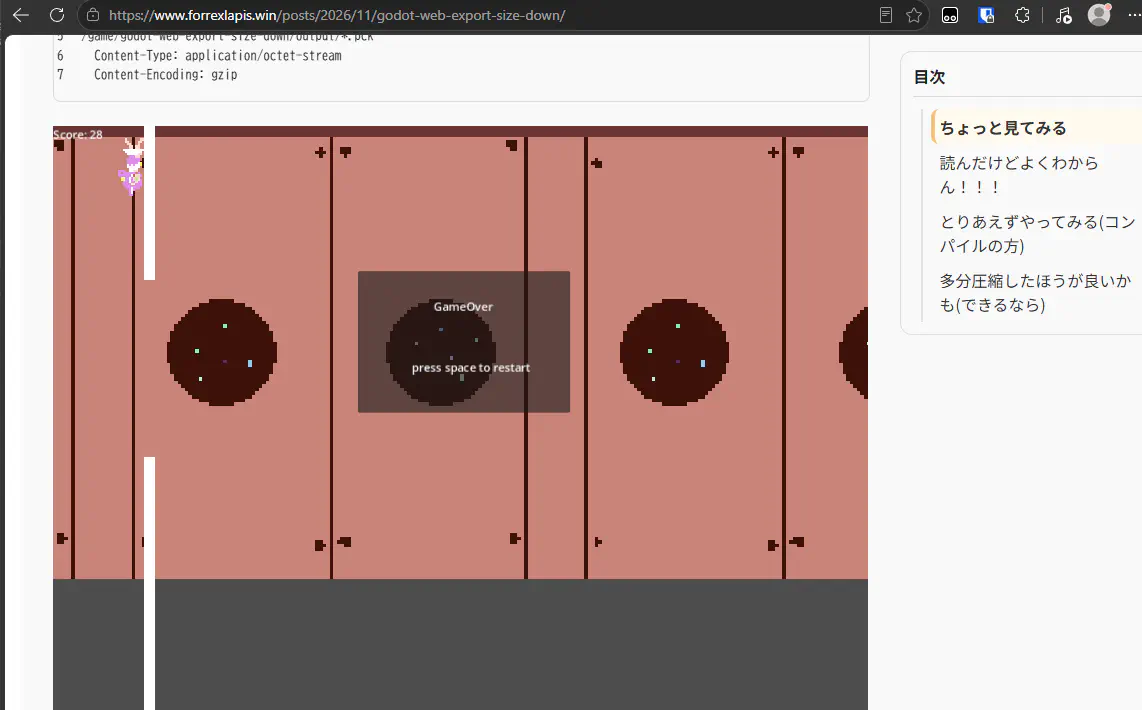
あああ~~~~~~!!!!やっと一回・・・とりあえず空白とかおかしいけどゲームをプレイすることができた~~~
もーーーあんまり何もわからないけどいいや!!!とりあえず動いたっぽいし!!!!!ね!!!!!終わり!!!!
とりあえず圧縮することができたら意外と公開できるかも!自サイトで!!ってことはわかったからもういいや!!!!
コメント
Fediverseの投稿がコメントとして表示されます! Fediverseで返信する 返信がコメントとして表示されます!